Posted1.53
Publisher Description
Featured on Apple's "Apps For Shopping" List
THE BEST DELIVERY TRACKER ON THE APP STORE
180+ SUPPORTED PROVIDERS
ACCOUNT SYNC
PUSH NOTIFICATIONS
BARCODE SCANNING
SMART EMS TRACKING (combines origin and destination information)
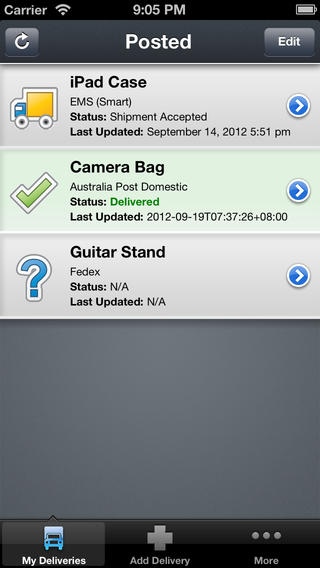
Posted enables you to track your delivery parcels from many shipping & courier companies. Once you add in your tracking number, Posted will display all relevant details about your parcel so you know exactly what is happening with your latest purchase.
-----------------
FREE LITE VERSION:
Make sure Posted is right for you!
-----------------
Features:
--------------
Currently supports over 180+ delivery providers
Push notification when the status of your parcel changes
Estimated delivery dates (where supported)
Barcode scanning (3GS or newer).
--International Couriers
Aramex, CEVA, DHL, Fedex, iParcel, LBC Express, MSI, Purolator, TNT, Toll Global Express, UPS
--Europe
GLS, AsTrack, Ecoparcel
--Armenia
HayPost
--Australia
Allied Express, Australia Post, Couriers Please, Direct Freight Express, Fastway, Go Logistics, Hunter, Interparcel, Northern Kope, Smart Send, StarTrack, TNT, TOLL IPEC & TOLL Priority, TransDirect
--Austria
Austria Post, DPD
--Belgium
Belgian Post
--Bolivia
Correos Bolivia
--Brazil
Correios Brazil
--Bulgaria
Bulgarian Post
--Canada
CanPar, Canada Post, Landmark, Loomis Express, Purolator, R+L
--Chile
Correos Chile
--China
China EMS, China Post Registered, DNJ Express, Fedex, Hong Kong Post, SendFromChina
--Croatia
Croatia Post
--Cyprus
Cyprus Post
--Czech Republic
Czech Post, GLS, PPL, DPD
-Denmark-
Bring, Post Danmark
-Finland-
Itella
-France-
Adrexo, ChronoPost, La Poste/Colissimo, SoDEXi, TNT
-Germany-
Deutsche Post, DHL, DPD, Hermes, iloxx
--Greece
ACS, ELTA, Hellenic Post
--Hungary
DPD
--Indonesia
Pos Indonesia
--Ireland
An Post, DPD
--Israel
Israel Post
--Italy
Bartolini, Poste Italiane - Paccocelere3, EMS, Internazionale, Maxi, Pacco Ordinario, Raccomandata, SDA, TNT
--Japan
Japan Post International
--Latvia
Latvijas Past
--Lithuania
Lithuanian Post
--Luxembourg
P&T Luxembourg
--Malaysia
PosLaju
--Mexico
Correos de Mexico, Estafeta
--New Zealand
Courier Post, Fastway, NZ Couriers, NZ Post
--Netherlands
Bring, DHLForYou, Kiala, TNT Post NL
--Norway
Bring, Norway Post, Tollpost Globe
--Poland
DHL, Poczta Polska
--Portugal
CTT, MRW, SEUR
--Russia
Edostavka, Russian Post
--Singapore
Sing Post Registered Article, Speedpost, vPost
--Slovakia
Slovakia Post
--South Africa
South African Post
--Spain
Chronoexpres, Correos Spain, MRW, SEUR
--Sweden
Bring, DHL, DirectLink, Posten Sweden
--Switzerland
DHL, DPD, Swiss Post
--Taiwan
Taiwan Post
--Thailand
Thailand Post
--Ukraine
Ukrposhta
--UK
APC Overnight, City Link, CitySprint, Collect+, Crossflight, DHL, DPD, DX, Fastway, Fedex, Hermes, Home Delivery Network, Interlink Express, Interparcel, Parcelforce, Royal Mail, TNT, UK Mail, Yodel
--USA
A-1, CEVA, DB Schenker, DHL, DHL GlobalMail, Eastern Connection, Ensenda, Fedex, Landmark, LaserShip, Newgistics, OnTrac, Postclub, Prestige Delivery, R+L Carriers, Streamlite, TNT, UPS, UPS Mail Innovations, USPS
Bugs/Problems/News
----------------------
If you experience any problems please email help@postedapp.com
Follow on twitter: @postedapp
Disclaimer:
---------------
* Posted is not affiliated with any of the postal companies.
* Posted relies on the websites of the various companies for tracking information.
Requires iOS 4.3 or later. Compatible with iPhone, iPad, and iPod touch.
About Posted
The company that develops Posted is Erick Geisler. The latest version released by its developer is 1.53.
To install Posted on your iOS device, just click the green Continue To App button above to start the installation process. The app is listed on our website since 2010-02-17 and was downloaded 27 times. We have already checked if the download link is safe, however for your own protection we recommend that you scan the downloaded app with your antivirus. Your antivirus may detect the Posted as malware if the download link is broken.
How to install Posted on your iOS device:
- Click on the Continue To App button on our website. This will redirect you to the App Store.
- Once the Posted is shown in the iTunes listing of your iOS device, you can start its download and installation. Tap on the GET button to the right of the app to start downloading it.
- If you are not logged-in the iOS appstore app, you'll be prompted for your your Apple ID and/or password.
- After Posted is downloaded, you'll see an INSTALL button to the right. Tap on it to start the actual installation of the iOS app.
- Once installation is finished you can tap on the OPEN button to start it. Its icon will also be added to your device home screen.
